Trends in short video: how to ride one without breaking your brand
The difference between riding a sound, a format, or a topic, plus a heuristic for knowing when a trend has peaked.

Why I wrote this
The trend question is the one I get asked most by small-business owners I talk to. Should I jump on this sound. Is this format still working. Did I miss the boat on that topic. The honest answer is: it depends on what kind of trend it is, and how late in its life you are catching it.
Most advice I have read about trends treats them as one thing. Either "ride every trend" (which gets you a feed that looks like everyone else) or "do not chase trends" (which gets you invisible). Neither is right. Trends are a tool. Like any tool, they work when you know what they are for.
So this is the short version of how I think about whether to jump in. Three kinds of trends. Different rules for each. Plus the one heuristic I use to decide if the trend has already peaked.
The three kinds of trends
A trend is not a single thing. It is one of three shapes, and they behave differently.
A sound trend is a piece of audio that the platform algorithm is currently amplifying. A format trend is a structural pattern (the cuts, the on-screen text shape, the way the camera moves) that creators are copying. A topic trend is a conversation or a current event that everyone is talking about. They have different half-lives, different risks, and different rules for whether to use them.
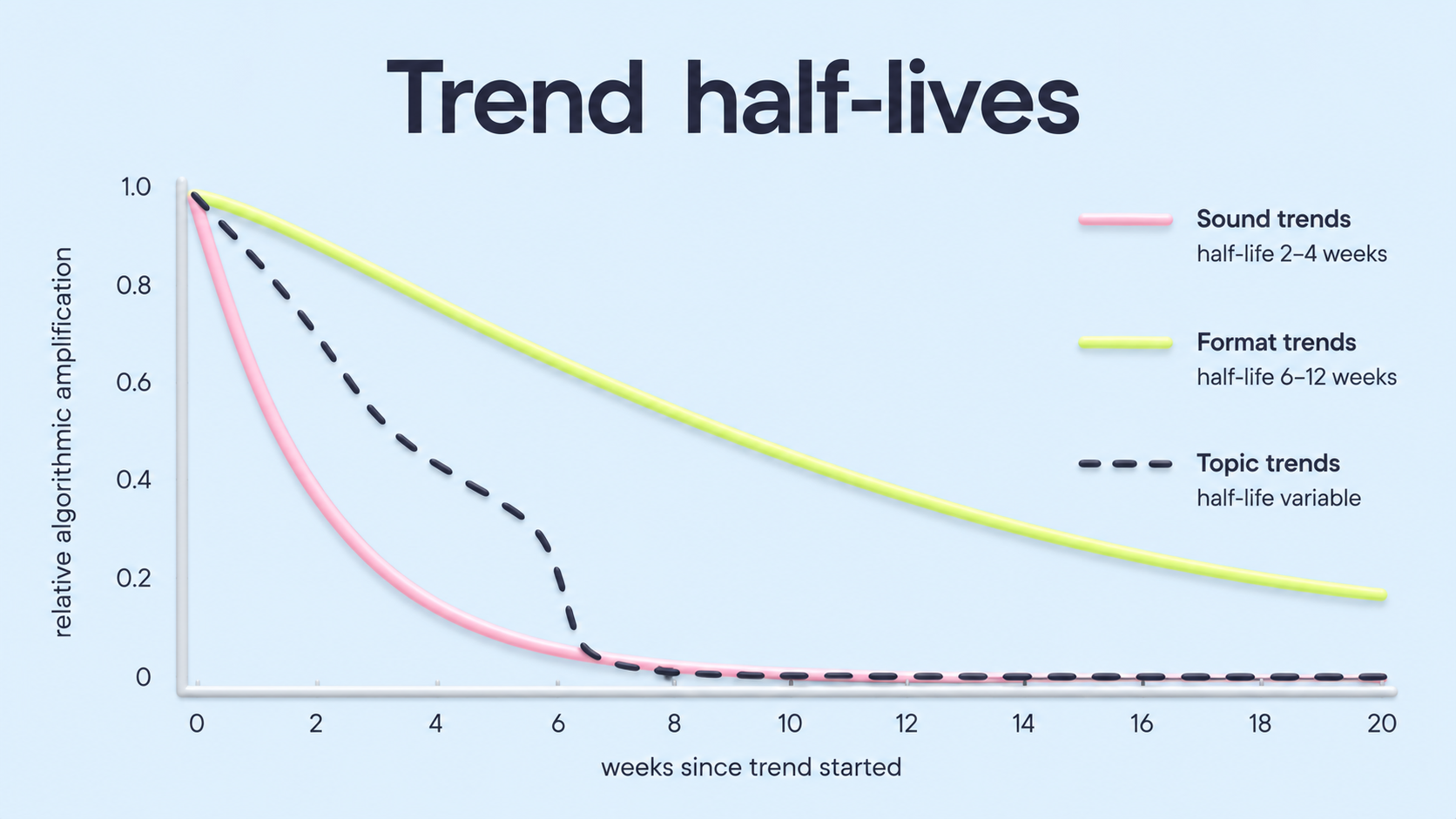
How each trend type works
Sound trend
Half-life: 2 to 4 weeks at the platform peak, then a long tail of niche use. The risk: using a sound that is past peak gets your video labelled "behind." The benefit: a trending sound gets an immediate algorithmic boost that does not depend on the content quality, which is useful if the rest of your video is strong but you are new to an account. Use when the sound matches the emotional shape of your content. Avoid when it forces you to film something off-brand to fit the audio.
Format trend
Half-life: 6 to 12 weeks. Longer than sounds because formats encode useful information (the cut pattern that retains attention, the text placement that is readable at scrolling speed). The risk: lower than sound trends, because even a "late" format is usually still working. The benefit: you can learn from why the format succeeded and adapt it to your topic. Use when the format genuinely fits the video you want to make. Avoid when adapting the format requires distorting your message.
Topic trend
Half-life: variable. Some topics burn for 48 hours (a celebrity news cycle), some for months (an industry shift). The risk: the highest of the three, because a hot take on a topic you do not understand can damage your credibility for a long time. The benefit: real conversation participation, with the relevance halo of being there when it mattered. Use when you have a genuine perspective on the topic from your work. Avoid when you are just commenting because everyone else is.
A trend is borrowed attention. The bill is how well your content fits the trend, not whether you got in fast enough.
The half-life heuristic
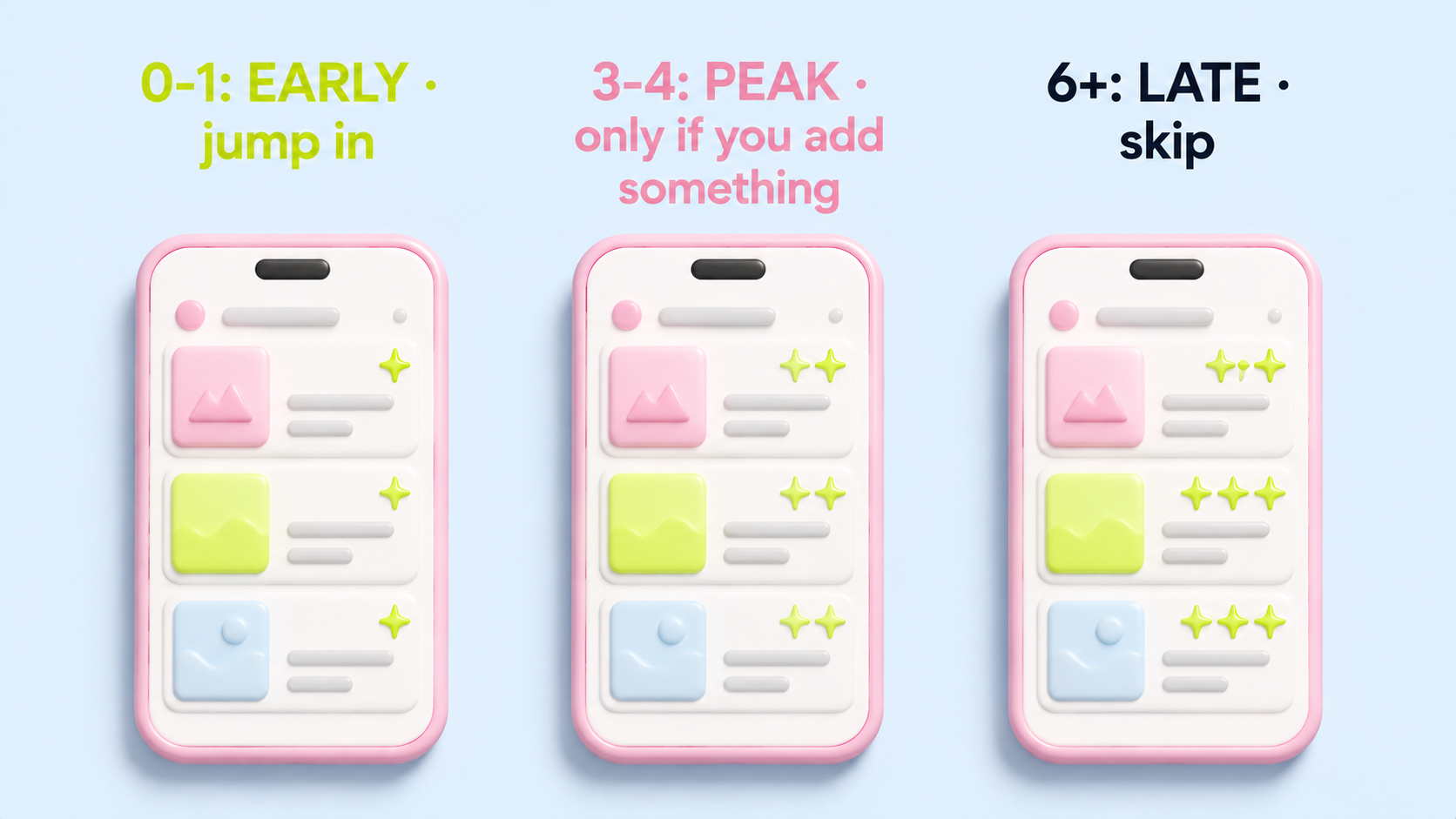
Before you jump in, scroll for two minutes through your own For You feed. Count how many videos using this trend you see. Zero or one: you are early, jump in if it fits. Three or four: you are at the peak, the boost is real but the differentiation is gone, only ride if your content adds something the other versions did not. Six or more: you are late, the algorithm has started showing fewer of these, the audience is fatigued, skip.
The heuristic is rough on purpose. The signal you are reading is whether the platform is amplifying the trend now, not whether the trend is technically alive. By the time a trend is technically dead, the algorithm has already stopped showing it to you.
How Jeena tells you whether the trend helped or borrowed
The half-life heuristic tells you whether the trend is still being amplified. It does not tell you whether the trend version of your video is better than the non-trend version. That second question is the one viewers answer, and a Jeena report surfaces it in three layers.
Run two versions of the same idea (one with the trending sound or format, one without) through the same panel, and read the three layers side by side.
Where to look in the report
- Attention on the trend beatThe aggregated heatmap shows whether viewers stayed visually engaged through the moment that carries the trend (the sound drop, the format cut, the topic mention). A flat heatmap through that moment means the trend was not delivering the attention you borrowed it for.
- Reaction at the trend moment vs your momentThe wow-moments chart shows where viewers reacted. A trend version that spikes reactions at the trend beat but goes flat at your message beat is a video where the trend is doing all the work, and you have rented an audience that is reacting to the sound, not to you.
- Perception languageThe post-watch survey distils into a perception line. If viewers describe your trend video using words from the trend (the sound name, the format style, the topic) instead of words from your message, the trend has borrowed the slot you wanted to occupy. If the description centres on what your video was about, the trend amplified you rather than replacing you.
What the side-by-side usually reveals
The trend version almost always wins on the first metric (attention at the trend beat) and almost always loses on the third (perception centred on your message). The interesting case is the second metric. When reactions at YOUR beat hold up in the trend version, the trend is amplifying you. When they collapse, the trend is paying itself.
Ditching the trend rarely fixes this. Planting your message louder or earlier does, so the trend boost lands on something viewers will remember as yours.
What this means if you are about to post a trend
Sound trends are the cheapest to use and the cheapest to skip. If a trending sound fits your video, attach it. If it does not, do not contort the video to fit the sound. The sound is a small algorithmic boost. Your content is the whole rest of the bet.
Format trends are worth studying even if you never use them. The format trends that survive past their first six weeks survive because they encode something true about how short video works. The fast-cut hook, the text label that lands by second one, the wide-zoom reveal. Even after the trend dies, the principle stays useful.
Topic trends are the only category where being early matters more than being good. If you have a genuine perspective on a hot topic, post it in the first 24 hours of the conversation or do not post it at all. Three days late on a hot take is the same as three months late.
Check whether the trend actually lands before you commit
Film one version of your video using the trend, and upload it to Jeena. Real viewers watch it on their phones with the front camera on, and you see whether the trend gave the video extra attention or distracted from your message. The attention heatmap shows where viewers were looking during the trend beat. The perception summary tells you how viewers described the video, whether the felt impression centred on the trend or on your content.
No "schedule a call." No sales rep. Upload, get your report in a couple of days, decide whether the trend is helping or borrowing without paying back.
Frequently asked
Should a small business jump on every trending sound?+
No. The boost from a trending sound is real but small, and using a sound that does not fit your video makes the video feel off, which costs you more attention than the boost gives you. Use trending sounds when they fit the emotional shape of what you are filming. Skip them otherwise.
How can I tell if a trend has peaked?+
Scroll your For You feed for two minutes and count how many videos using the trend appear. Zero or one: early. Three or four: peak. Six or more: late. The signal you want is whether the platform is currently amplifying the trend in your specific feed, not whether the trend is technically still alive on social media in general.
Is it better to start a trend or join a trend?+
Joining is faster and lower risk. Starting is rarer and higher upside, but most "starts" are accidental, and the trends that catch are usually started by accounts that already have distribution. For most small businesses, joining a trend in the early window (zero to two videos in your feed) is the realistic version of "starting" one.
What is Jeena?+
Jeena is a neuromarketing platform for short-form video. Real people watch your video on their phone with the front camera on. Jeena captures their gaze direction, blink rate, eyebrow raises, and their impressions of the video in a short survey afterward. You receive an AI-powered report with an attention heatmap, a visibility map, a wow-moments chart, a summary of how viewers perceived the video, and three specific recommendations for making the video work harder.
How does Jeena measure viewer attention?+
Jeena uses smartphone front-camera gaze tracking. Each engager calibrates once, then watches your video. The platform records where their gaze lands frame by frame, flags moments of surprise from facial expression, and combines that with a short impressions survey afterward. The result is a per-second timeline of what real viewers actually looked at and felt, plus a summary of how they perceived the video overall.
How much does it cost to test a video on Jeena?+
A typical test costs around ten euros. See the pricing page for current rates.